Deepthi is the Founder of dbanuggets and a SQL Database Administrator. As a Microsoft MVP, she helps SQL communities by sharing her expertise in resolving SQL Server problems globally.
September 2025 Month of T-SQL Tuesday is hosted by Todd Kleinhans, asking us to write about “Mastering a Technical Skill”. Thank you Todd for hosting this month of T-SQL Tuesday.
I would like to write about my learning about Microsoft Fabric recently. I have been a Database Administrator all my career and recently started learning Fabric by signing up to Amit Chandak’s Microsoft Fabric Bootcamp.
I really appreciate Amit for doing this for the community. This bootcamp is totally free and has been taught both in English and Hindi (the Indian national language). We can also access all the videos on Amit’s YouTube channel here.
Since I registered for this boot camp, I have had the chance to watch a couple of sessions about Fabric and am looking forward to catching up with the rest of the ongoing sessions. It is always good to learn about the technology that you are already familiar with, but want to go deeper into learning more about. I have been working with Power BI and Fabric for quite some time, but I am more into the administrative side of things. I believe listening to experts through the community-led bootcamps is an excellent way to learn a new or existing technical skill and get good at it.
There is always something new to learn in fast-moving technology, and having resources like these bootcamps is a great way to learn from experts. Not only bootcamps, but many online free conferences are going on throughout the year, and it is a great way to take advantage of these resources to learn new technologies.
By the way, I am one of the co-organizers for the upcoming free online conferences- Future Data Driven Summit (September 24th) and DataBash 2025 (September 27th). If you are interested in learning new technologies or you would like to dive deep into the topics that you are already familiar with, I highly suggest you register for these conferences. If you would like to know more about the topics and speakers, please visit the website to learn more.
I am happy to write this T-SQL Tuesday post, and thanks to Todd for the invitation!
Thanks to Kevin Chant for inviting us to write this month’s T-SQL Tuesday. This month is special, as Kevin mentioned due to the Festive Tech Calendar, which I have been speaking about for a couple of years now. Every day of the December month, a new recording or a blog post will be released for you to view. If you are not following their youtube channel yet, you must subscribe to get the wealth of information on the latest and the greatest features in Microsoft space.
As Kevin invited us to write about our most exciting feature, I would love to write about the SQL Database in Fabric.
Note: This is a new feature that was announced in the Microsoft Ignite 2024 in November.
“SQL database in Microsoft Fabric is a developer-friendly transactional database, based on Azure SQL Database, that allows you to easily create your operational database in Fabric. A SQL database in Fabric uses the same SQL Database Engine as Azure SQL Database.”
As you read, this is a transactional database that can be created in fabric and can be replicated to Data Lake for the analytical workloads. The other main goal is to help build AI apps fasterusing the SQL Databases in Fabric. The data is replicated in near real time and converted to Parquet, in an analytics-ready format. This database can be shared with different users without giving them the access to the workspaces but giving the access to the database will automatically give them the access to the SQL analytics endpoint and associated default semantic model. You can use the SQL database in Fabric for the data engineering and data science purposes. The other cool thing is, you can use the built-in git repository to manage your SQL database.
As you know Microsoft Fabric is a software as a service (SaaS) platform that combines data engineering, data science, and data warehousing into a unified analytics solution for enterprises. All of these services within the fabric can access the SQL Database in Fabric through the Data Lake for analytical purposes.
This feature is in Public preview now. You can test the SQL Database in Fabric for free for 60 Days. You need to have a fabric capacity.
Make sure to Enable SQL database in Fabric using Admin Portal tenant settings. For more details, you can follow this Microsoft doc.
You can query the database in fabric using the query editor, SQL Server Management Studio (SSMS), sqlcmd, bcp utility and GitHub Copilot.
As this is a new feature, there are resources available on Microsoft Reactor youtube channel. There are series of videos being released by this channel since couple of days ago. Please look below for the list of the videos and dates they are released:
Deepthi is the Founder of dbanuggets and a SQL Database Administrator. As a Microsoft MVP, she helps SQL communities by sharing her expertise in resolving SQL Server problems globally.
I am honored to invite you all to the September Month of T-SQL Tuesday blog party!
If you are new here and want to be part of the blog party every month, learn all about T-SQL Tuesday here.
Have you had any recent technological problems at work that you were able to fix? You might have tried very hard for days to figure out the answer to the technical issue you faced, but it turns out that a minor modification you made may have resolved the issue. Alternatively, the error message you see might be completely different from the solution you adopted to resolve the issue. Please blog for me about any problem, no matter how big or minor, that you may have encountered lately. I’d like to see all kinds of issues you’ve faced and how you fixed them.
I’ll share my latest experience here.
The DEV and UAT migrations for the SSRS migration project I was working on recently went well, but when we opened the webpage URL, we noticed the following HTTP address problem. ReportServer services servers and databases are housed on separate servers. The servers were set up correctly, the SSRS service delegation was established, and the Report Server service accounts had the appropriate rights to the Report Server databases. Days passed before I was able to work with the Server team member to resolve the problem—that is, we missed creating an SPN for the Report Service server using the Server name. The problem was fixed by adding the SPN made for the service using HTTP and the Servername. We also had to change the authentication configuration file to RSWindowsNegotiate instead of RSWindowsNTLM.
Until this problem was resolved, we had seen weird errors from an application running the reports, testing the data sources showed the login failure error message – “Login failed for user ‘NT AUTHORITY\ANONYMOUS LOGON'”.
Kindly submit your piece by Tuesday, September 10th, and leave a comment below. Also, post it to your social media platforms like Linkedin and Twitter with a hashtag #tsql2sday.
I’m excited to read posts from many SQL Family members.
Deepthi is the Founder of dbanuggets and a SQL Database Administrator. As a Microsoft MVP, she helps SQL communities by sharing her expertise in resolving SQL Server problems globally.
Thank you Mala for hosting T-SQL Tuesday for August month. Mala asked us to write about the Database version control and what tools we use to manage our database code. Please find the original invite here.
Earlier in my career as a DBA, the database code was managed with comments in the code to know who changed what, when, and the purpose of the change. It was tough to manage the code since many developers forgot to put in these comments properly. This is not a reliable way to maintain the code.
Then we decided to use the source control. Version control is where your changes in the code are tracked over time as versions. If in case you need to roll back to the previous version, you have the correct version in place as a point-in-time snapshot to retrieve that version back to rollback with much ease. Version control also helps with the collaboration of work by multiple developers working on the same project. There were several tools in the market. You can find the list here.
We used Redgate Source Control with the DevOps Git repository. Redgate Source control is a plugin you use in the SSMS tool. It will connect your databases to the source control systems like Git, TFS etc; Install the Redagte SQL source control tool from here.
We created a Project in the DevOps and select the version control as Git. We then initialize the main branch using the visual studio and clone the branch using the visual studio to local folder. We then connect the SQL database to the source control by connecting to the local folder. This will link the database to the source control. The initial commit will help us push the objects into the source control.
We can also use the Azure DevOps to create CI/CD pipelines to push the changes to each environment before committing the code into production. To find out what the CI/CD pipeline is, please read this Microsoft article.
I have described it very briefly here in this blog post about the database code solution we used but this is a wide topic to learn.
To learn about Azure DevOps implementing continuous integration using DevOps, check the Microsoft learn series here.
I am looking forward to reading the experiences of other SQL Community members regarding their journey with database source control.
Deepthi is the Founder of dbanuggets and a SQL Database Administrator. As a Microsoft MVP, she helps SQL communities by sharing her expertise in resolving SQL Server problems globally.
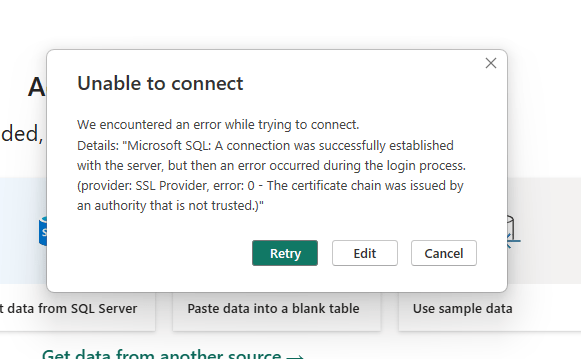
We recently updated our Power BI Report Server with a May 2024 update. Found that we were unable to open any reports using direct query. Paginated reports were all working fine. This also doesn’t apply to any reports using the import mode. We were not having this issue when using the Power BI desktop but only on the web page.
Below is the error message shown when opening the reports using direct query.
I had to check with my Community friends first as I was searching online if any others had the same issue. James Reeves, one of my community friends pointed me to resolution steps by sharing this medium article. Thank you to my friend.
As per my company standard procedures to contact Microsoft support for any issues, I have open a ticket with them to get action steps for resolution. They helped me resolve the issue. I promised them that I will be writing a blog post about how we resolved this issue so anyone having the same issue will have an idea of the resolution steps to this error.
When you check the Change log for Power BI Report Server, Version: 1.20.8910.25479 (build 15.0.1115.165), Released: May 28, 2024 release notes mentioned about the security change made during this update to add the environment variable and system variable on the Power BI Report Server machine.
Steps
Connect to your Power BI Report Server. In the search bar at the bottom > search settings > system > about > Advance system settings > Environmental variables
Click on the New under the Environment Variables > create new variable with name PBI_SQL_TRUSTED_SERVERS. In the variable value (usually, the value shown in your datasource of the direct query report)- give the FQDN (example – mysvr.microsoft.com) or Servernames seperated by commas (example – contososql, contososql2) or Machinename with the * at the end if you want to include all the SQL Server instances on the machine (example – contososql* which includes contososqlinstance1, contososqlinstance2 and so on). Click OK.
Repeat the same by creating the same variable with value in the System Variables too. Click OK.
Restart the Power BI Report Server and now try to connect to the report and you should be able to open it.
Also, do not forget to read the limitations to Connect to SQL Server database from Power Query Online here.
Deepthi is the Founder of dbanuggets and a SQL Database Administrator. As a Microsoft MVP, she helps SQL communities by sharing her expertise in resolving SQL Server problems globally.
Loved this question asked by Kevin Feasel for this month of T-SQL Tuesday, so here I am to write this post before this day ends. Please find the invitation here.
First, I would like to talk about my entire amazing interview process as a whole. It was multiple layers of interviews – Starting with my HR, my manager, and IT Director, interviews with all the DBA team members in sets of two per interview, and Cultural ad interviews with multiple teams focusing on Diversity, Equity, and Inclusion.
By looking at the list, are you already stressed? I felt the same when I was sent an email from HR with this list of interviews scheduled but I can say this is one of the best interview processes I have seen in my entire career. I had a chance to talk to each of the members I potentially work with if I were the chosen one for the position. My team members all the way to my Director. I have never seen any interview with a Director for a database administration position. This has to do completely with the Culture of the company and a clear example of how each of the potential employees are valuable to them.
I really appreciate all the companies who take real care in interviewing the best candidates for the position.
Coming to the best interview question from the same company – An interview with DBA’s. They asked me how I could manage my work and community work at the same time and how I find time to do all the community work apart from my work. They asked me if I rest and take time for myself. To be very sincere, I became emotional when they asked me this question. They asked me about my emotional well-being. I was all prepared technically and was ready to answer technical questions and hearing this come from them (Who are Experts in the Database Administration field) melted my heart. I was not expecting this at all. We also had technical discussions and it was a great interview with each of the DBA team members.
At the end of this interview (which was the final interview round), I made sure I let the interviewers know how wonderful the interview process was and I appreciated them for giving me the best time ever. I also let them know that this interview process was the best in my entire career. To be very sincere, I was not making up the words to impress the interviewers. I had enough experience to find another job if I was not selected for the role but I sincerely wanted to appreciate the entire team and the company for giving me the best experience ever.
Best of the Best, I am currently working here ❤
Thanks to Kevin for asking us to write on this topic. Really appreciate it.
Looking forward to reading the posts from other SQL Family members.
Deepthi is the Founder of dbanuggets and a SQL Database Administrator. As a Microsoft MVP, she helps SQL communities by sharing her expertise in resolving SQL Server problems globally.
Thanks to BrentOzar for hosting this month of T-SQL Tuesday. Please find the original post here.
Brent asked us to share the last issue that we resolved. I recently resolved a replication issue. I completed a transactional replication which is set between 4 servers. Let’s say, A, B, C, and D servers. A replicates to B which then replicates to C and then from Server C to Server D. The setup is complicated. On a regular process, Server A needs to import the fresh data on Server B tables that are involved in replication. It is not possible to drop the tables as they are currently involved in replication to B Server which then replicates the data to Server C. To make this possible, publications have to be dropped on Server B and Server C before importing fresh data from Server A to Server B. Once the tables are created on the Server B, then the publications are recreated.
As all these servers are involved and linked through transactional replication on the same tables, and publications are created on each of these servers, it gets complicated to drop and recreate the publications on Server B and Server C. We tried automating the process by creating the drop and recreate publication SQL agent jobs and using triggers to trigger the execution of the jobs one by one.
I know we can use other technologies in SQL Server to accomplish the same goal but the requirements and the limitations from vendors made us to stick with this plan.
So, the setup is complete. Soon after, I saw one of the recreate publication jobs fail due to the replication agent account being locked, and the downstream jobs all failed as they were interlinked to each other. Though the resolution is simple to enable the locked account, it is hard to figure out that this is the reason for the replication being broken. Especially, when these jobs fail across multiple servers.
I enabled the replication agent account and rerun the job to success. Then manually executed each of those failed jobs to succeed on the rest of the Servers. I am currently in the process of figuring out why the account is locked in the first place.
I know it is challenging to maintain the replication but it gets even tougher with complicated replication setups across multiple servers.
This is the last issue that I fixed the last Saturday night at 1am, LOL. Glad the issue is resolved.
Though the setup is tough and things seem complicated, I was able to successfully migrate the servers from older versions to new versions without breaking the replication setup that is required between multiple servers.
I am looking forward to reading the other SQL family posts on this month’s T-SQL Tuesday.
Deepthi is the Founder of dbanuggets and a SQL Database Administrator. As a Microsoft MVP, she helps SQL communities by sharing her expertise in resolving SQL Server problems globally.
If you are not very familiar with the Query Store feature, please check my series of blog posts on Query Store here.
In this post, you are going to learn about the advancements of the Query Store released in SQL Server 2022. This is the first blog post for this series. You can expect more posts in the coming weeks related to the Query store usage in the Intelligent Query processing features released in SQL Server 2022.
Advancements in SQL Server 2022:
Query Store enabled by Default – For any new databases that you create on SQL Server 2022, the Query Store feature is enabled by default. If you are migrating the database from lower versions to SQL Server 2022, the query store feature is not enabled by default. You need to manually enable it if the feature is not enabled manually on the lower version before. While choosing the configuration options, you need to make sure you capture only the required queries and not the insignificant queries that you do not bother capturing. To effectively capture the queries you need and save space for the Query Store data, you can customize the capture policy based on the total compile CPU time, total execution CPU time, and execution count. Example of the custom policy (source)
2. Query Store on Secondary replicas – In SQL Server 2022, Query Store can also gather the information from the secondary replicas and send it over to the primary replica through the same channel that sends the data to the secondary replica. Once the data is captured and sent the data over to the primary replica, the data is hardened to the Query Store schema on the primary database. Query Store for secondary replicas is available for preview. It isn’t available for use in production environments.
You will need to enable the Trace flag 12606 before you enable the Query Store for secondary replicas.
There are some steps to follow in enabling the Query Store on secondary replica –
The primary database should have the Query Store enabled on it and it should be in the read-write mode before enabling the Query Store on secondary replicas.
Since the secondary replicas are all in read-only mode, you need to enable the Query store on the secondary replicas by connecting to the primary and running the below query on each database you would like to enable. This will enable the Query store for all the secondary databases.
ALTER DATABASE [Database_Name]
FOR SECONDARY SET QUERY_STORE = ON (OPERATION_MODE = READ_WRITE );
GO
To find more information about the replicas, you can use sys.query_store_replicas. You can find the replica_group_id, role_id, and replica_name.
3. Query Store Hints: We do have this feature available in Azure SQL database and Azure Managed Instance. It is also introduced in SQL Server 2022. When you have a query that will improve the performance with the query hint, you can use the Query store hints. Just like the regular query hint, it is the same way to use but the main important thing is that you do not have to change the underlying code of your query. You can use the system stored procedure designed for the Query Store hint sys.sp_query_store_set_hints.
You can use the Query store hints in the scenarios where the query needs to be recompiled, setting the MAXDOP, setting the memory size grants for your queries, compatability level at the query level, using specific kind of the joints like using Hash join in the place of the nested loop joins.
To see the example of how you can implement the Query Store hints, see my blog post on this here.
Some things to remember while using the Query Store hints:
If you are using a force parameterization option at the database level, remember that the Query hint ‘RECOMPILE’ will be ignored. Any other query hints will be used and execute the query. When this happens, there will be a warning 12461 issued by the SQL Server.
If there is any contradictory hints used while using the Query hints, simply the other hint will be ignored without issues with execution. The query will run fine.
If you are already having any hints at the statement level or any plan guides on your queries, they will be ignored by the Query hints. Query hints will always override these.
Prior versions of the SQL Server 2022 only captured the data using the Query store on the primary replica and Query Store hints are only applied to the primary replica but in SQL Server 2022 – once the secondary replicas are enabled to capture the data from Query Store, Query hints are replica aware for the secondary replicas.
4. Intelligent Query processing features in SQL Server 2022 – uses the Query Store data to capture the information overtime to capture the feedback and use that feedback for better performance of your queries. All the below highlighted features in blue were released in SQL Server 2022. To use these features, you just have to place the compatibility mode of the database to 160.
The only IQP feature released in SQL Server 2022 that doesn’t require the Query Store to be enabled is ‘Parameter Sensitive Plan Optimization” also known as PSP Optimization.
In the coming series of blog posts, I would like to go in detail of each of these IQP features with queries explaining how these features help in optimizing the performance of your queries and how Query Store help support these IQP features.
Deepthi is the Founder of dbanuggets and a SQL Database Administrator. As a Microsoft MVP, she helps SQL communities by sharing her expertise in resolving SQL Server problems globally.
Thank you Reitse for hosting January month of T-SQL Tuesday year 2024. This is my first blog post in the year 2024. Reitse asked us to write about any lessons learned from the old projects. Please find the original invite here.
I had to work on a project years ago where there was a requirement to migrate the old version of the database (SQL 2000) to SQL 2012/2016. One of the requirements was to use the replication to replicate the data over to another server. This is an OLTP database where there were heavy transactions per second. As a part of the planning, I recommended using the Always on Availability groups instead of the replication. My manager at the time (from my previous company) was a person who trusted and supported male DBAs more than female DBAs regardless of their expertise. I had to respect the decision to replicate the data over using the availability groups for read-only reporting purposes. I didn’t even have the chance to test the scenarios, compare the results from the two technologies, and show the results in the test environment.
Once the project is completed and in production. There comes the problems with replication. There were intermittent network failures, issues with the settings in the files generated by the snapshots, and other typical issues with the replication- there was a heavy lag in transferring the data. If you worked on replication before, you surely know fixing replication issues was no joke. We had to later remove the replication for good and replace it with the always-on availability groups. This has not only improved the performance overall but also required less maintenance.
Though the management understood later that they must have taken a different approach, the cost of it was the time and resources spent on the project.
One of the other projects was about the tools we wanted to purchase for data governance. Depending on one tool is not a good case when you are still in the process of deciding which tool to purchase for your needs. We had to spend a lot of time on one tool for the Proof of concept for months only to decide it didn’t serve our needs. This took a lot of DBA and the other team resources for months. I believe understanding the requirements from the company’s perspective should be the first step in the process. Then compare the tools from the wider perspective of whether they can serve all the requirements we are looking for. Filtering this way can give us the list of tools we can try and test to decide further.
These are the two experiences I would like to share in this post. I am looking to learn more on this topic from others as well.
Deepthi is the Founder of dbanuggets and a SQL Database Administrator. As a Microsoft MVP, she helps SQL communities by sharing her expertise in resolving SQL Server problems globally.
This will be the last post for this year – writing this a few hours before the end of the year! I will keep this short and not boring.
Would like to thank you all for staying with me along my learning Journey. You are the main reason why I still continue to write these posts. Thank you and Thank you!!
As I look back at the year 2023, the main thing I can say is, that it was super fast. I still remember the day I wrote my 2022 year-end review. Time flies so fast and we get older quick.
I would like to reflect on this year as per my professional growth and personal growth.
Professional
Community Speaking and Other Engagements
Spoke at many local user groups and International conferences like SQLBits and PASS Summit 2023.
Published 17 blog posts in the year 2023 with 17.2K views and 11.7K visitors for this year. Totally, dbanuggets crossed over 56.6K all-time views and 36K visitors.
Personal
I was interested in learning philosophy for a very long time. I had started educating myself on Stoic philosophy starting with Marcus Aurelius Meditations. Started listening to Rober Greene Audio books on Audible starting with The 48 Laws of Power. Recently fell in love with J. Krishnamurthy’s philosophy, this is my all-time favorite I can say because I am finding answers to some complex questions about life and I truly believe Krishnamurthy has answers to my questions. Really enjoying his hour-long lectures.
I am looking forward to continuing to publish more blog posts, community work including speaking engagements, and Mentoring in the year 2024.
To all you wonderful people who read all the above lines and reached this section of this post – These are a couple of the things I learned about life this year. Would like to share some of them here.
Live this life as much as you can – cause you don’t have any other lives to jump into. No matter how much you feel this life sucks, you are traveling on your own road (your life). Stop looking at the other roads cause you don’t know where they turn and how far the other roads lead. Those roads have their own bumps, speed breakers, and dead ends. Focusing on our road is the only way.
If you are trying to solve any particular issue in your life, try to examine it and do research on the issue. Fear disappears once you understand what the issue is. You can find books, and videos talking about the issue in detail. As you do the research, you will find you are not the only one having the same issue – which in itself solves half of your worries. Along the way, you might find a community of people trying to solve the same problem or achieve the same life goal.
Do not bother about what others think of you. Don’t take other people’s negativity towards you personally. They do not know you, your dreams, your ambitions, and the work you do while they are not watching you. Have empathy towards them. They may be going through a lot in their lives and have many insecurities in their lives.
No matter how big of a problem you are facing, many people may be going through the same exact problem at the same time as you. We are the human species that lived on earth for 200,000 years. Problems do repeat themselves but as we are more focused on our own lives, we feel we are the only ones facing the issue.
See your problems from a broader picture – most of the time, you will end up realizing you are giving greater attention than it needs.
At the end of our lives, none of these problems matters.