Deepthi is the Founder of dbanuggets and a SQL Database Administrator. As a Microsoft MVP, she helps SQL communities by sharing her expertise in resolving SQL Server problems globally.
Happy new year to everyone. This year January T-SQL Tuesday is hosted by Raul Gonzalez asking us to write about the scenarios which are not necessarily the best practices but scenarios where we had to implement the practices which are supposed to be avoided. Thanks to Raul for bringing this topic as I have some interesting scenario related to replication where I had to replicate the data from SQL Server 2012 to SQL Server 2000. I know, its the old server SQL 2000 which is unsupported.
According to the best practices from Microsoft, it is recommended that the transactional replication can be compatible and supported in going two versions higher including the same version (SQL Server 2012/2014/2016) or two versions lower (SQL Server 2008 R2/2008).
The scenario that I faced was little challenging. We had SQL Server 2012 production server replicating data to a Server 2000 which is used for reporting purposes. Subscriber SQL Server 2000 used by the reporting team were not ready to upgrade the Server as they need to rewrite their entire application as it was using vb6 code. They need a strategy where the data can still be replicated without upgrading the Server.
As I researched, I found that it is not compatible version but planned to test the replication to see if somehow it works. I tested the replication between SQL Server 2012 as a publisher and SQL Server 2000 as subscriber. I was able to setup the transactional replication between the servers for the database but found during the initial initialization snapshot, the ANSI_PADDING setting in the snapshot generated .sch files caused the issue while the distribution job runs. The setting was OFF for the .sch files which I need to turn back on. Please see the below one of the errors I have faced in my situation, took the error reference from here.
“SELECT failed because the following SET options have incorrect settings: ‘ANSI_PADDING’. Verify that SET options are correct for use with indexed views and/or indexes on computed columns and/or query notifications and/or xml data type methods. (Source: MSSQLServer, Error number: 1934) Get help: http://help/1934″
It is easy to fix the .sch file manually if it is just one file that needs to be changed for the setting ANSI_PADDING from OFF to ON but there are many .sch files with the same setting “OFF”. The most tedious part is that the error only shows one .sch file at a time. I need to fix the .sch file digging into the details of the error and then run the distribution job again to see the next error for the .sch file. I found a very handy PowerShell script answered by Asaf Mohammad in Microsoft forum where you can place this script as the last step in the snapshot job. Once the snapshot of the database is created and the .sch files are generated, this script will search for all the .sch files with ANSI_PADDING setting and edit the files having the settings from OFF to ON. This process happens automatically when ever the new snapshot is generated or the reinitialization of the subscription happens as it forces to create the new snapshot of the database.
Once I fixed this error, I was able to replicate multiple databases from SQL Server 2012 to SQL Server 2000 implementing the job step for each database snapshot job. I was able to solve the problem by using the PowerShell script. Since then, I did not see any specific file errors related to this error.
This was one of my real time experiences where I had to walk against the recommended best practices and found success in setting up the replication with some issues which I was able to resolve. I am looking forward to reading the experiences of other SQL family members in seeing successful results in such scenarios.
Deepthi is the Founder of dbanuggets and a SQL Database Administrator. As a Microsoft MVP, she helps SQL communities by sharing her expertise in resolving SQL Server problems globally.
Reflecting back at 2022, it was a great year with challenges but had learned many things. This year 2022 has bought some significant changes to my life as a person. This blog post is a quick overview of my year 2022.
Speaking:
I started my speaking journey back in 2020 with my debut session for New Stars of Data. Since then, I continued speaking at different events, both local and international events. I continued my speaking in year 2022 as well but most of my presentations were virtual. I was honored to be selected for the PASS Summit 2022 and decided to go in person to give my presentation for the first time ever.
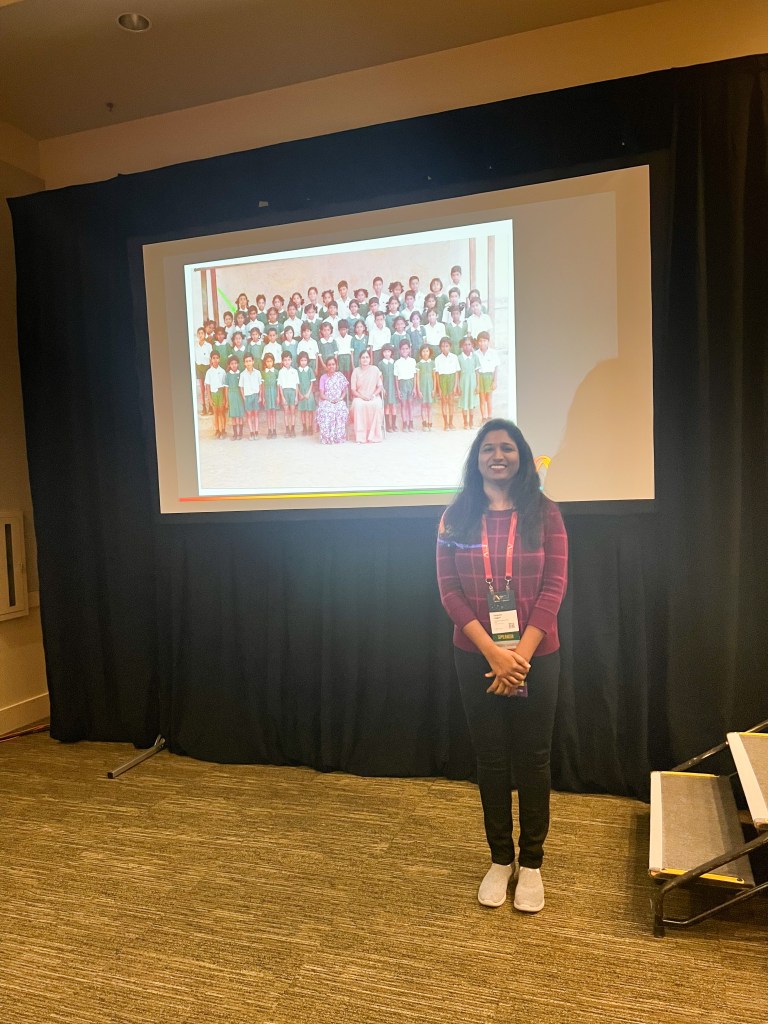
To be very sincere, I was scared and worried of how I would be presenting in person for the first time at that big conference but I am blessed to have wonderful attendees who patiently listened to me during my talk. The first ever presentation I gave in person was on the topic “Women in Technology: How to become an Ally” where I decided to be vulnerable in sharing my story starting from my primary school days. Special thanks to Rie Merritt for reviewing my session and for giving your valuable feedback. Never in my dream I thought my story would connect to audience so well that it would made them shed the tears throughout the session. First few minutes were nerve-wracking and could easily felt in my voice but as time pass by, I felt more and more comfortable in sharing the story. In addition to that, some of my friends, mentors and well wishers attended the session to support me during my presentation. Thanks to Chris Wood, Jeff lannucci, Alpa Buddhabhatti , Kevin Chant and Martha Osorio for attending my session and supporting me with your presence. Your presence had a positive impact on delivering my presentation successfully. Thank you so much.
Me presenting at “Women in Technology: Becoming an Ally” Session at PASS Summit 2022
I received a very good feedback from audience for this session. Later, I presented a technical session along with my dear friend Surbhi Pokharna on the topic “Performance Monitoring, Tuning and Scaling Azure SQL Workloads” which was successful as well. We received great feedback on this session too. I also participated in the panel discussion for Diversity, Equity and Inclusion along with my friend Jean Joseph. I also gave a pre-recorded lightening talk presentation on “10 minutes in to SQL Notebooks”.
For the year 2023, I am honored to be selected as one of the speakers for SQLBits 2023. I will be presenting one technical “A to Z Azure SQL Security Concepts” and a non-technical session “Can an Introvert become an International Speaker? If so, How?” with my dear friend Alpa Buddhabhatti. I am going to present both the sessions virtually.
I will continue to speak on the technical and non-technical sessions in the coming year 2023.
Microsoft MVP Award
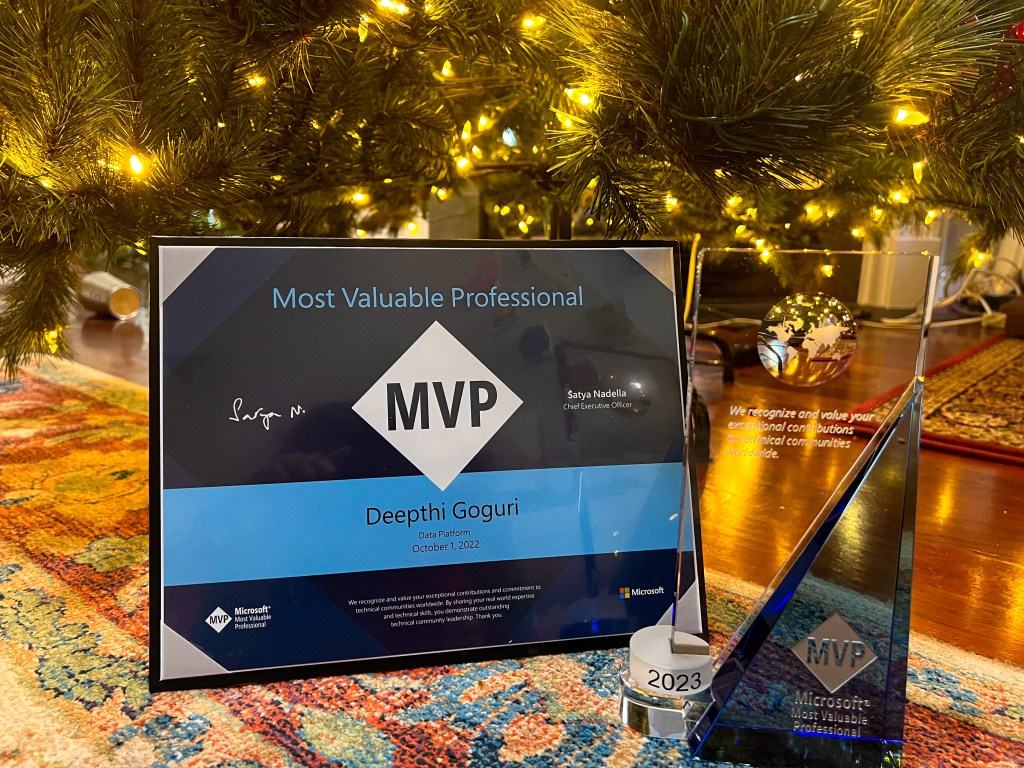
I have been awarded the Microsoft Most Valuable Professional Award on October 1, 2022 by Microsoft. It is a great honor to be recognized as an MVP. This is a prestigious Award from Microsoft. If you are not familiar with the details of the award, please look here.
Redgate 100
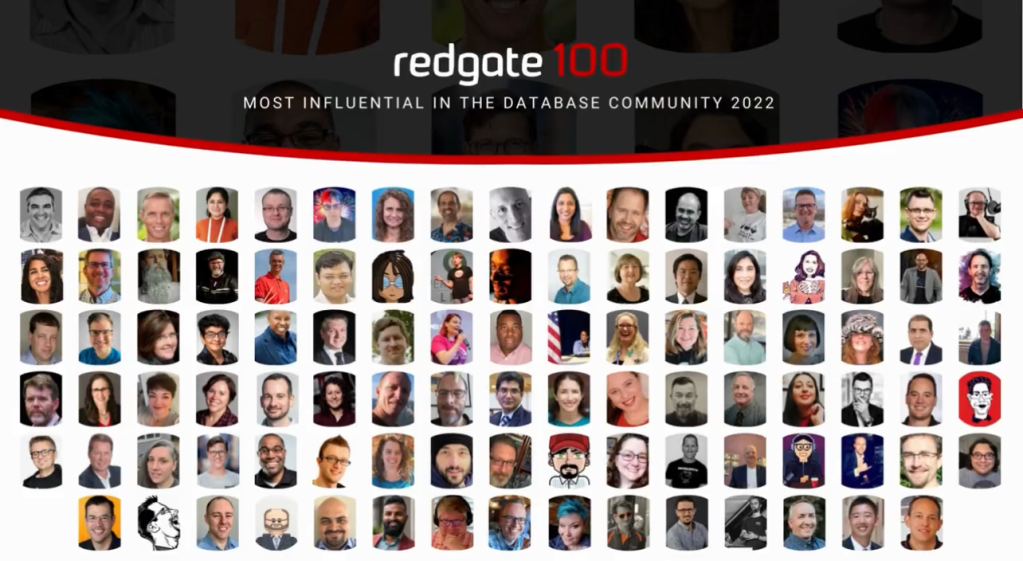
Really honored to be recognized in this year’s Redgate 100 top online influencers in ones to watch category for creating impact in the database community. I am really honored to be listed among other famous celebrities from SQL Family.
Honored to be on the Committee list for PASS Summit 2022 in improving the Diversity, Equity and Inclusion at the Summit. It was a real great experience in working with other committee members and with Redgate as they continuously take actions and make an effort to improve the DEI at the Summit.
Mentoring
From the past year, it has been a huge honor in mentoring other women coming from the underrepresented countries. It helps them in being vulnerable, comfortable in sharing their story as I come from the same background as well. Sharing and moving ahead in the environments where you can succeed but also support and help other woman thrive in the same environments is the most beautiful thing I can ever imagine. Mentoring is always a two way street. I learn from my Mentees and it has been a great learning from them. I would like to continue to mentor in the coming years as well.
I have been blogging about the Query Store and on Azure fundamentals in the past year. You can find the in depth series of posts on Query Store, please find here and blogs related to Azure here. I have been participating in the T-SQL Tuesdays. Its been a while I continued with my posts on Azure. I will have to be consistent on posting them. In 2023, I hope I will be writing more of the posts related to Azure.
Women in Technology Volunteer and Co-Organizing data Platform DEI user group
I feel blessed to be able to volunteer WIT user group in maintaining the Women speaker page “Webinars by Women“. I usually gather the details of women speakers along with the events they are speaking in the near future and upload the information into the portal. This will help the audience to look at the page for attending their sessions, helps event organizers who are looking for women speakers. This page is like a central location where you can find most of the women speakers from the data platform world and the event details of where and when they are speaking. I consider this as a great opportunity to serve the WIT community which is close to my heart. I highly suggest you to follow WIT page and DEI user group page on twitter to receive new upcoming session updates. If you follow these twitter handles, it will help you in being notified with updates and also show a kind gesture of you supporting women and diverse set of groups from the data platform world.
I am also serving as a Co-organizer for Data platform DEI virtual user group with amazing Tracy Boggiano and Jess Pomfret. I am so happy to work with both of them to organize the events and meetings for DEI user group.
Co-Organizer for Microsoft Data and AI South Florida User Group
I am happy to serve as a co-organizer for Microsoft Data and AI South Florida user group along with my dear friend Adriano.
Talking about my lows
Alright, so all the above information is related to highs. Everyone has to go through both highs and lows at certain point in their lives. I would like to share about my lows here. As you can see in one of my previous blog post, I have gone through lot of challenges and gaining back self confidence is not an easy few step processes. It is a continuous journey and if you fall in the trap of being low for long period of time, it will consume you and your time in complete. I had several times where I felt low for a good amount of time. During those times, I do not feel like learning anything, write any blogs or even engage in speaking. I am sure everyone has these periods in their lives where they get depressed or let the past struggles drive their present lives.
To gain back my power, I had to listen and watch a lot of motivational videos on YouTube. I read “Can’t Hurt Me” by David Goggins which helped me come out of the tough times in my life. I recently started to listen to the audio version of the book again because I felt like I am falling back again. I also purchased David Goggins second book “Never Finished” and I am going to purchase the audio book as well. David Goggins straight forward approach and his sincere suggestions (though he uses cuss words, I don’t mind them at all as it helps me realize where I am in my life in a raw way with out using soft words, babying me telling its okay to be a down in life).
David Goggins is the sole reason for where I am today in my life. If not his book, I do not know if I even would have realized what I was going through. I was waiting for someone to save me and felt like a victim of abuse for many years. His book gave me strength to face my own fears. I stood up for myself after long time.
So, am good after reading the book, right? I should be in a place where I never turned back to the past and as I now gained self confidence, I should be good, right? Well, that is not the case. I need to constantly remind myself that I am capable of doing something when self doubt creeps in and tells me where I was in the past and yells at me to never forget the past. It is a tape record that plays in my mind which pulls the past back and disturb my present time. We all face these situations sometime in our lives. When we do, we need to remember that we cannot change the past but we still have a choice to make things better in the future. We need to understand that several things in life are out of our control and no matter how many times we think about it, we can change nothing. Figuring out how those exact negative circumstances can fuel us for making a better future for ourselves is important. I am still in the process of knowing myself and fighting my own fears. It is a life long process.
If you are going through rough times in your life and are looking for someone outside of yourself to save you, I am going to tell you the hard truth that no one is coming to save you. You need to save yourself by doing the work needed. I only learned this from David Goggins book. I highly suggest you read the books to gain back your power. If you think I am doing publicity of these books, Yes, I am 🙂 and I am very proud to do so as they are truly self help books which changed my life.
As we are close to end of the year, I wish you all the best and Good luck for the year 2023! Thanks for reading!
Deepthi is the Founder of dbanuggets and a SQL Database Administrator. As a Microsoft MVP, she helps SQL communities by sharing her expertise in resolving SQL Server problems globally.
Thank you Garry Bargsley for hosting the December month of T-SQL Tuesday!
Garry wanted us to write about the year end checklist for the Database administrators. I would like to write about the checklist I prefer to follow every month of the year.
Some of the important monthly checklist are as follows:
Backup validation: Making sure your database backups are valid. You can do that by adding CHECKSUM while taking the backups, verify the backups regularly using VERIFYONLY option and also test the restore if it works properly by actually restoring the backup on different environment. Make sure you run the DBCC CHECKDB to be extra safe in making sure your backups are in consistent state.
Database monitoring: Making sure the monitoring tool you use are not missing any of the instances. Making sure the alerts are triggered properly and email filters are in place to receive those alerts.
SQL Server Security updates: Making sure your Servers are patched properly and all the services are working properly after the patching. I mention this because we recently found an issue with Master data services unable to connect to the database after SQL Server Security patching on either SQL Server Server where MDS database is hosted or on the MDS application server. We need to manually go ahead and update the database from the MDS configuration manager. To run this step of updating the database after patching, the user who runs this update needs to have super user permissions to MDS. If you are planning to take the vacation, make sure these servers specific to MDS are patched and properly updated. If you are in vacation and other DBA’s doesn’t have enough permissions to update the database or if they don’t have proper documentation to the procedures, it would be a disaster.
Documentation, please: No matter how small the task and the resolution steps might be, having proper documentation of steps for troubleshooting any issue helps the DBA team members have peace of mind while resolving the issue. Make sure documentation is in place and the location to these documents are shared with all team members.
Job failure notifications and please no success notifications: Make sure you only receive failure notifications and disable if you have any success notifications setup on any of the servers you built. Make sure the job owners are valid.
Check for any password expirations: If any of the AD accounts are the owners of any jobs from task scheduler at OS level and if those accounts has password expired, you will get continuous notifications for those failed jobs due to password expiration. Making sure changing those passwords before going to vacation helps. I mentioned this example because I have seen cases in my past company where emails are bombarded with the failure alerts due to password expiration.
On-Call: If you plan to take vacation and if your DBA team is small, make sure there is a backup for the On-Call person just in case. Having the updated contact information in outlook teams where everyone can access your contact information is crucial.
These are some of my monthly activities to check. I am looking forward to read the posts from other SQL family members on the same topic. I am sure there will be plenty of activities to take a note of.
Deepthi is the Founder of dbanuggets and a SQL Database Administrator. As a Microsoft MVP, she helps SQL communities by sharing her expertise in resolving SQL Server problems globally.
This blog post is related to speaking at New Stars of Data. If you read the title, this post is for the professionals who wish to become the speaker but the self doubt is pulling them back from taking that first step.
I totally get that feeling. I was in the same situation two years ago. Self doubt was not just creeping in from time to time but it was part of who I was back then. I was going through depression due to the harassment I faced from my previous company for years in a row. I have no self esteem and lost self confidence bit by bit as each year passed through harassment. While I was in the darkest dungeon of my life, I finally decided to standup for my self. I know no one will come to rescue me and it is me who needs to walk towards the light from that darkness. I know it takes time but it is not impossible. But how? Where should I get the strength and energy to move a step forward when I have every reason to feel like a victim of abuse and harassment and be right in the same place? I was tired of blaming my fate for the situations I was in and I remembered I always can make a choice in any situation life throws at me.
I then decided there should be a challenge that I need to take that can build my self confidence back.
In the process of searching for a challenge, I opened twitter account only to follow BrentOzar and his new blog post news. I saw a tweet which said something like “If you are looking to speak at the event for the first time, New Stars of Data is the conference you can look into”. When I first read this tweet, I never thought I would submit for this conference. For the next couple of days, I couldn’t able to sleep properly as this tweet keep popping up in my head. Those thoughts screaming at me “what if this was the challenge you are looking for? Speaking can get back your self confidence, think about it! If you miss this chance, you may not get another chance”. These thoughts were consistent for couple of days. I know in my heart that I was not ready and I will never will. I just cant relax and wait for the perfect time to start doing the things that are right for me to do.
I decided to take the first step in the faith and submitted my abstract for the New Stars of Data 1. I then prayed to God from bottom of my heart that my session should not be selected. I was that scared and had that big self doubt. God went against my will and selected my session 🙂 It was a blessing in disguise. I know I put myself in a uncomfortable situation only to test myself if I can face the challenge. If I can, I know it is only for my self growth.
At the time of my abstract submission, I didn’t know that I will be supported by a Mentor by New Stars of Data conference organizing team (NSOD). Ben Weissman and William Durkin are the Organizers for NSOD conference. I was blessed to have Deborah Melkin as my Mentor. Her smile almost always calmed my tensed nerves. Deborah and I had weekly meetings to prepare my presentation. Deborah was very patient with me during the process. She helped me build my presentation and Andy Yun also helped me in giving a proper flow to the presentation. Both Deborah and Andy helped me build the presentation, reviewed it and had dry run before the NSOD presentation. That rehearsal session actually helped in fine tuning the presentation.
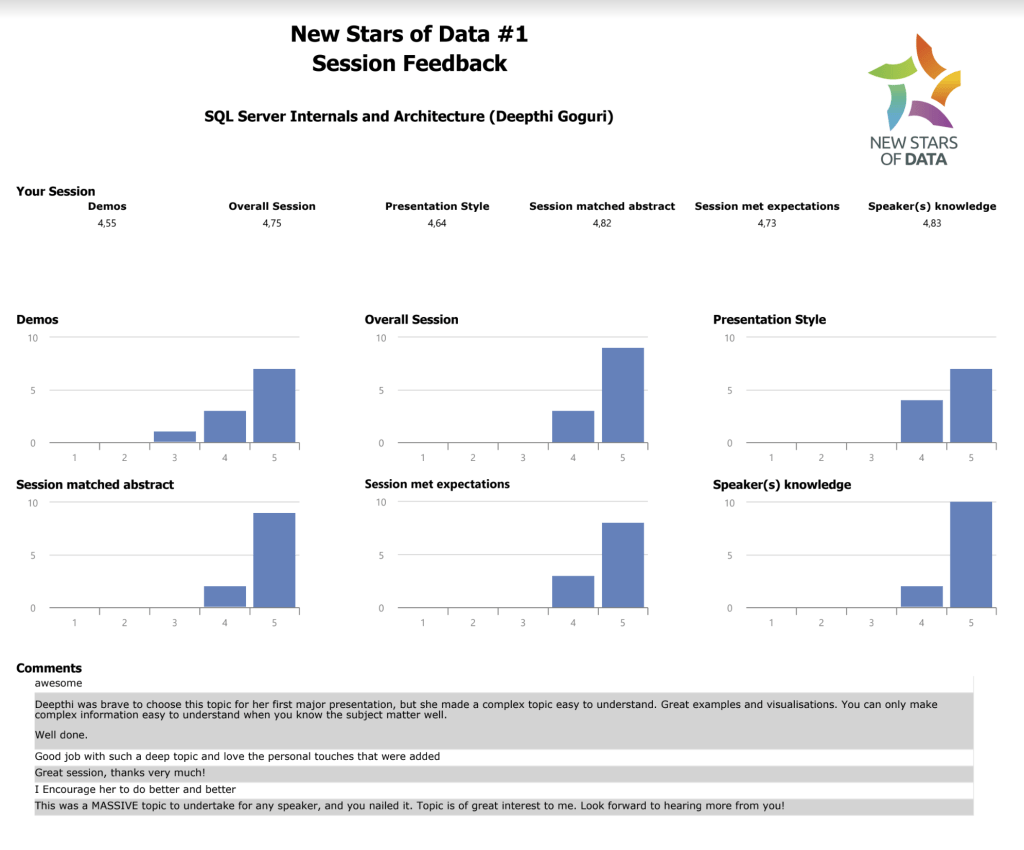
During my big day of NSOD, Deborah was moderating my session. Thanks to Ben and William for thinking above and beyond about the comfort of the new speakers without us even asking for it. As Deborah was a familiar person to me and as she was my mentor, I was super comfortable in delivering my presentation for the first time. My presentation went well, at least not terrible I believe, lol. After I completed my presentation, attendees were asked to provide the feedback. Please look at the feedback provided by the attendees below. It was such a great honor to be able to present at NSOD and to receive such encouraging feedback.
This feedback has helped me to take another step and present this session and another sessions at different events and conferences within United states and at different international conferences across the globe.
Since then, I have spoken at different user groups, SQL Saturdays, local and international conferences. I have presented more and more to get my self confidence back. I believe it is a continuous process and I am still in the process. Healing from the trauma takes time. I have presented at more than 200 events till date. I did it like I was obsessed with speaking because the more I present, the more I gained inner peace. The more peace I had in my heart, the more confident I felt. I had mention this at many events but would like to mention it here again.
“At the darkest moments in my life, I have chosen Speaking as a way out. Speaking has become a therapy to me. It will be a therapy to me for the rest of my life!”-Deepthi Goguri
To all the professionals who are reading this and are interested in becoming a speaker for the first time, I would highly suggest you to submit your sessions to New Stars of Data 5. NSOD has changed my life and I am sure it will change your life for good as well.
Though you think you are not ready yet, believe you will never be ready until you take the step and put the things into action. Remember, experience will never come if you wish and dream of a better future. Experience will only come with action. Go ahead and take the first step in faith. Do NOT self reject.
After reading this blog post, I am confident that you will be motivated enough to submit the sessions. With the same confidence, I would like to wish you all the best and Good luck on your submissions!
Deepthi is the Founder of dbanuggets and a SQL Database Administrator. As a Microsoft MVP, she helps SQL communities by sharing her expertise in resolving SQL Server problems globally.
Thanks to Tom Zika for hosting this month of T-SQL Tuesday! Tom asked us to share about the tips for the perfect production code.
Below are some of the tips I would like to share for the better production ready code:
1. A production ready code is always readable with detailed comments of what changes are being made to the existing code. Detailed documentation is important as this code is going to stay for years moving forward. Why, when and who changed the code needs to be documented. I have seen situations where these obvious details are being missed in production code. Code is here to stay, Developer who have written the code may or may not stay in the same company.
2. Best practices for commenting, I highly suggest you read the BrentOzar excellent post here.
3. Check for the execution times based on the DEV, TEST data. I have seen scenarios where the data size in the DEV and TEST environments are not same as production data. This can cause the difference in the execution times from lower environments to production. It is always suggested to test your code in lower environments having same amount of data as production.
4. Unit testing is important to find out if there will be any resource contention or concurrency issues ahead of time before implementing the code in production. Please find the free unit testing tools here.
5. Error handling your code. You need to have procedures in place to handle and capture the errors if in case you encounter the errors. Rollback procedures should be in place. Please read the details here. This is an excellent article on transaction handling in SQL Server.
6. Tune your code before going to production. Check for the indexes that you can create to improve the performance. Check if there are already existing indexes with the columns before creating the indexes, you may be creating duplicate indexes.
7. For better readability and style of your code, check these formatting tools here.
8. Give the sensible alias names for columns in the code.
9. Test all the use cases. Do you remember any situations where you had deployed your code in production and it failed and now everyone blames the testers and developers for not checking every use case scenario. Thorough testing on all use cases is important for a successful production deployments.
10. Do not run the code you see online directly on production. I know, I know, you will say never! but even the code from the legitimate website you always use, please check the entire code, test the code in test environments before thinking to use the same sample code in production.
These are some of the things that you can check if your code is ready for production deployment. I am looking forward to read the posts from other SQL family members for this month T-SQL Tuesday!
Deepthi is the Founder of dbanuggets and a SQL Database Administrator. As a Microsoft MVP, she helps SQL communities by sharing her expertise in resolving SQL Server problems globally.
Thanks to Glenn Berry for hosting this month T-SQL Tuesday. Glenn wanted us to write about the new features that we are excited about in the SQL Server 2022. Please find the invitation here.
I am very excited about the performance capabilities in SQL Server 2022. When we talk about performance, you know how much Query Store feature has actually helped in finding and resolving the slow performing queries since this feature got introduced in the year 2016.
If you already used the Query Store feature for your databases, you know it needs to be enabled at the database level. The primary use of this feature is to capture the execution plans and execution stats information for your queries over time so you can identify the regressions between the execution plans and take this information to fix most troublesome queries easily.
Starting SQL Server 2022, the Query Store feature is going to be enabled by default when you create new databases. If you need to migrate databases from older SQL servers to SQL Server 2022, then you need to still manually enable this feature.
In SQL Server 2019 and below versions, there is no support for the read only replicas for availability groups, meaning the query data is only collected to Query Store on primary replica and not the readable secondary replica. In SQL Server 2022, the query data is collected into Query Store on the secondary read only replicas for availability groups. Query Store hints can also be used in SQL Server 2022.
The other feature is the Query optimization for the parameter sensitive queries. In SQL Server 2019 and below versions, the moment the query executes for the first time, it saves the plan in the plan cache with the parameter value used for the first execution. The next time the same query runs with the different parameter value, the initial plan that got stored in the plan cache will be used. If the parameter that is being used for the first execution is sensitive, then it can generate a plan which can have resource consuming operators that can effect the next executions of the query with different parameters. This is because the same stored plan from the plan cache is reused.
In SQL Server 2022, multiple plans are generated based up on the parameter sensitive values and are saved in the plan cache. Depending on the parameter values, the optimizer will sniff the parameter value and use the execution plan based on the parameter value. This is a very useful feature as it can mostly solve the parameter sensitive query issues as the optimizer choses the right optimal plan for your queries based on the sensitivity of your parameter value.
I did not get a chance to test the performance capabilities in SQL Server 2022 but I am going to create a new demo for one of my upcoming sessions related to performance capabilities and Query store enhancements in SQL Server 2022.
Thanks to Glenn Berry one more time for boosting our interest in trying out the new features in SQL Server 2022 and to share the knowledge to the world.
I am looking forward to read this month T-SQL Tuesday posts from other SQL family members and learn their excitement and learnings from the new features SQL Server 2022.
Deepthi is the Founder of dbanuggets and a SQL Database Administrator. As a Microsoft MVP, she helps SQL communities by sharing her expertise in resolving SQL Server problems globally.
Thanks to Kevin Kline for hosting this month of T-SQL Tuesday! Kevin wanted us to share about the events that has changed our lives in a better way.
Becoming a speaker has changed my life. I decided to become a speaker during the dark times in my life. Speaking has become a therapy to me. It has helped me pass through the rough times in my life.
I am always thankful to the conference “New Stars of Data” for giving me the opportunity and the platform to speak for the first time as a Speaker. My journey begin from here as a Speaker.
I have presented at many events later. Dataweekender is the second conference that gave me the opportunity to speak. This is one of my favorite conferences as well.
As I speak more, I gained a part of my confidence back. It is a continuous process. I took the step and decided to speak at the lowest point in my life. I sincerely can say that New Stars of Data event is a life changing event to me.
To anyone who wanted to become a speaker but if lack of confidence is stopping you from taking your first steps, please rethink. Confidence only comes by practice.
I can say that very sincerely because I spoke at several events later only to build my confidence. The more I presented, the more comfortable I became. Though I only presented virtually till date, I will carry the same confidence I gained when I present in-person.
When I think about the in-person events, I need to write a bit about the PASS Data Community Summit 2022. I am honored to be selected as a speaker at this year’s summit and I chose to present in-person.
I am very nervous to present in-person for the first time ever and that too for the biggest Data platform summit in North America. I believe having nervousness is a good thing when you are presenting because it will force you to prepare more and keeps you laser focused.
As New Stars of Data gave me a life as a Speaker, PASS Data Community Summit 2022 will definitely take me to the next level as a speaker as I will be presenting for the first time in-person.
Attending and presenting at the Conferences like SQLBits was one of the best experiences. Attending other events like EightKB is a great opportunity to learn internals about the SQL Server.
There are other conferences I have attended and learnt from other speakers.
During the Journey as a speaker, I have met new people along the way and few of them became my good friends for life!
I cherish all the moments…
I am very thankful to each and every organizer of the conferences, User groups and to each person who helped me along the way giving me the opportunity and supporting me at each step in my journey as a Speaker.
I would love to read other SQL Family member posts about this topic. Would love to learn from them how attending or speaking at different conferences changed their lives.
Deepthi is the Founder of dbanuggets and a SQL Database Administrator. As a Microsoft MVP, she helps SQL communities by sharing her expertise in resolving SQL Server problems globally.
Thanks to Deborah for hosting July month of T-SQL Tuesday!
I would like to share a rant on a situation I faced working on the database Server migrations couple of years ago.
In the past few years, I have done several database and server migrations. As you know, there are many things that needs to be taken care of during the testing phase until we do the actual migrations.
It is not simply the database that we migrate but all the related objects needs to be migrated as well. The agent jobs, SSIS packages, linked servers and most importantly updating the connections to the datasource information, not only to the database related objects but also to the related applications.
If you are using the Servername and database name in the connection strings in all the applications connecting to your database being migrated, this process gets tough and tedious to update once the database is migrated to a different server. It is always advised to use database DNS in the connection strings instead of the IP address or the Servername.
This also applies to the report server datasources as well.
I know it is hard to make the change but if the change is good, it is worth the effort.
During several database Server migrations, I have seen developers feeling comfortable in changing their application code to the new Server name instead of taking the advice of database DNS. I know the amount of work that goes behind to find the objects referencing the server names. Missing any one of the locations can absolutely break the code and mess really hard.
I have experienced many times where developers had failed updating the SSIS packages or failed Linked Server connections once the databases are migrated. This problem can be solved simply by using the database DNS instead of the Server name. You will be only updating the DNS entry pointing to the new server name once you migrate the database to point to the new Server environment.
I know many companies already follow the standards of using database DNS but there are still others out there doesn’t want to make the change and instead fix the problem when applications break.
I believe it is not only important to fix a broken application somehow but how effectively and simply you can avoid causing the applications to break in the first place.
I am very interested in reading other SQL family member posts on this topic!
Deepthi is the Founder of dbanuggets and a SQL Database Administrator. As a Microsoft MVP, she helps SQL communities by sharing her expertise in resolving SQL Server problems globally.
Okay, so you would like to deploy your databases in Azure! Great. Your resource limits are based on the deployment you chose. Managed instance and Azure SQL database resource limits depends on the Service tier, compute tier, the number of vCores you chose.
Before migrating the databases to Azure, knowing the details of what deployment model (IaaS/PaaS), deployment method (Azure portal, Azure CLI, PowerShell, ssms tool), region you wish to deploy, Service tier, compute tier, purchasing model, hardware and size of your databases is crucial (Source).
The deployment option and the service tier you chose directly depends on the resource limits that you get. Compute resource limits like the memory, storage limits like max size of your database log file, how long the backups are secured, IOPS, tempdb size limit etc.;(Source).
There are couple of things that we need to focus on while deploying the Azure SQL database. The region where you would like to deploy, under which resource group you would like to place the database, logical server name to connect to the Azure SQL using ssms, Admin SQL login credentials, purchasing model and service tier.
Creating the Azure SQL database using the portal is the basic method of creating a single database. Remember, you cannot restore a native backup in Azure SQL database but restore using the bacpac file. In MI, you can natively restore the database using the url.
Any resource that you create requires the subscription, resource group, database name, logical server name and credentials,
While configuring, you will have an option to chose if the database needs to be created as a part of the elastic pool (databases in the pool will share the compute resources together).
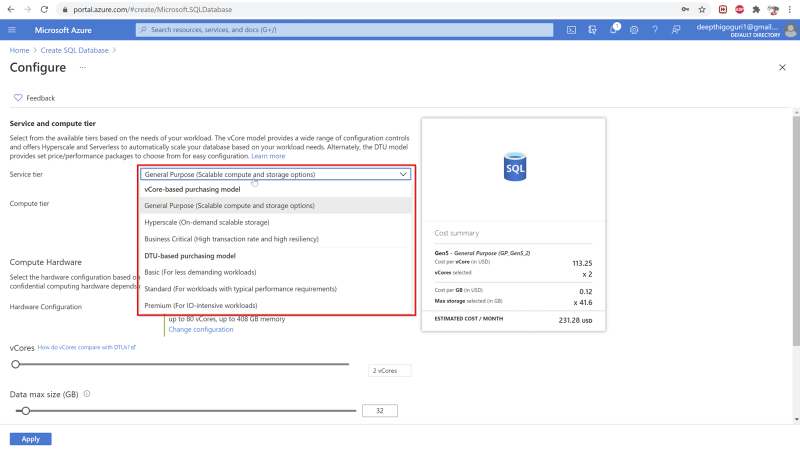
As you click on the configure compute and storage, you can chose the service and compute tier here.
If you chose the general purpose, you will have the compute tier options “provisioned”/”serverless”.
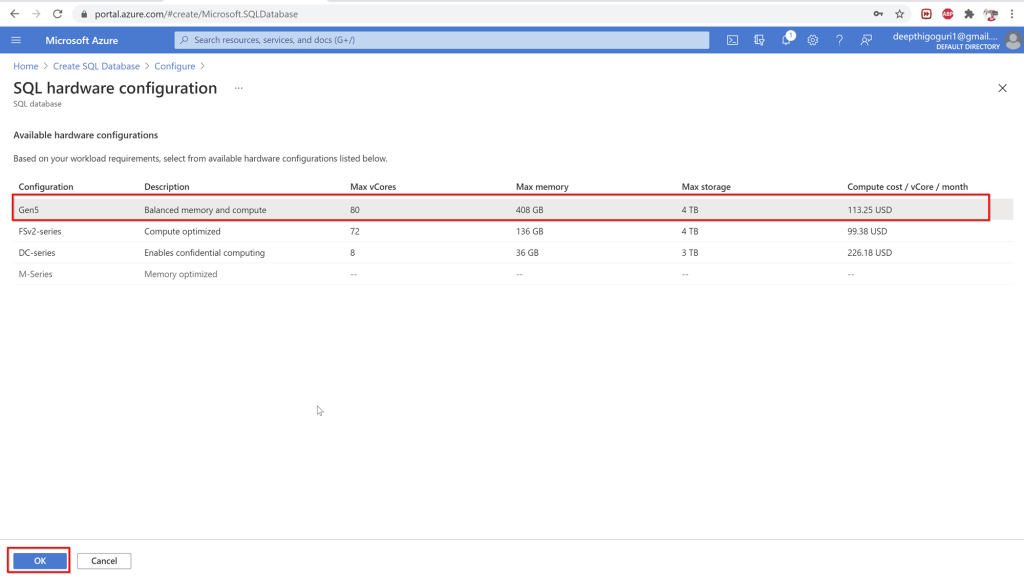
Chose the hardware configuration.
Select the hardware
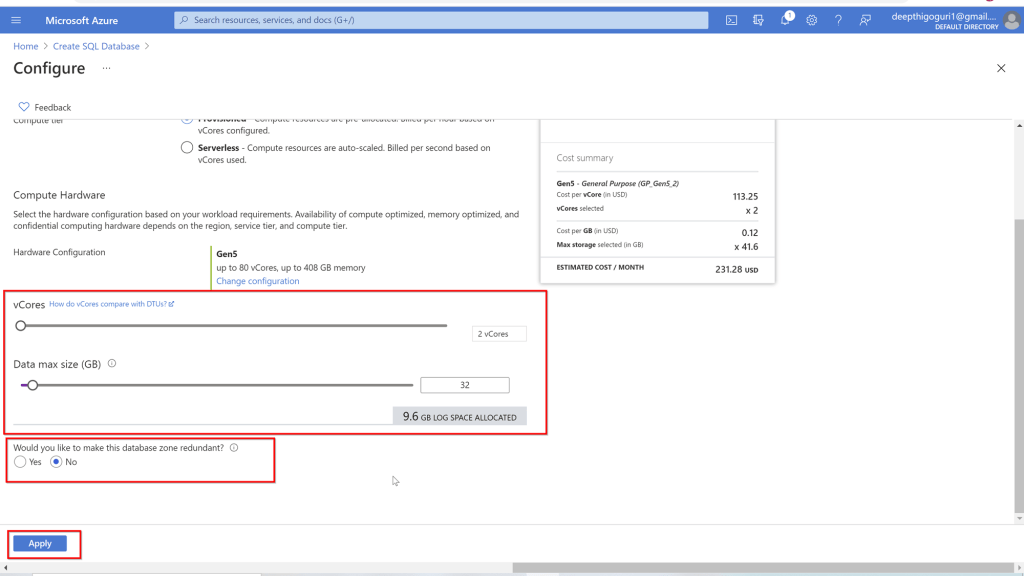
Scale up or down to adjust the number of vCores and data max size.
Backup storage redundancy has three options. To find the differences among those, see here.
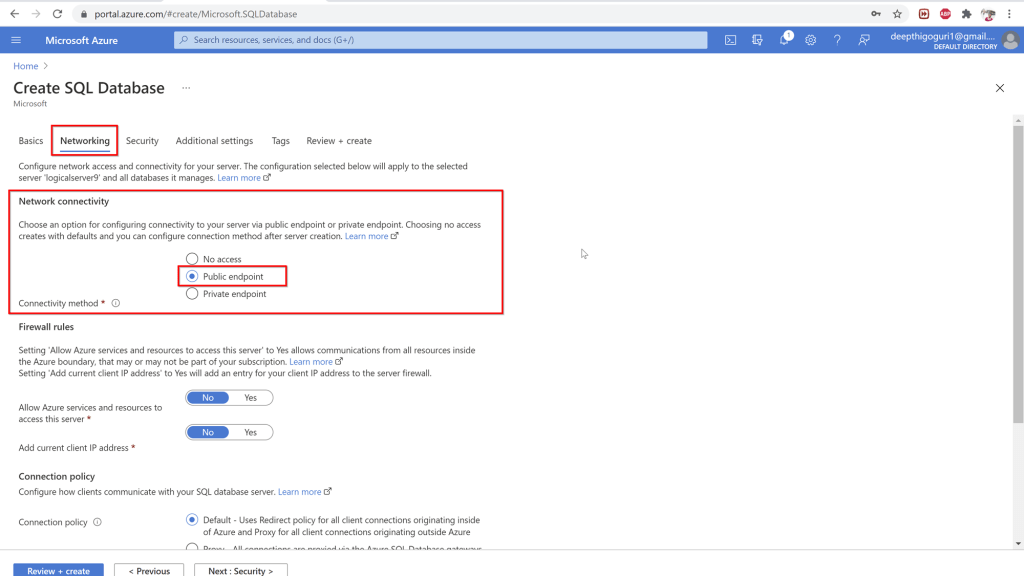
Networking tab:
Network connectivity:
No access: no one will have access
Public endpoint: quickly connect but not secure.
Private end point: Most secure way to connect by creating the private ipaddress to connect to from your virtual network.
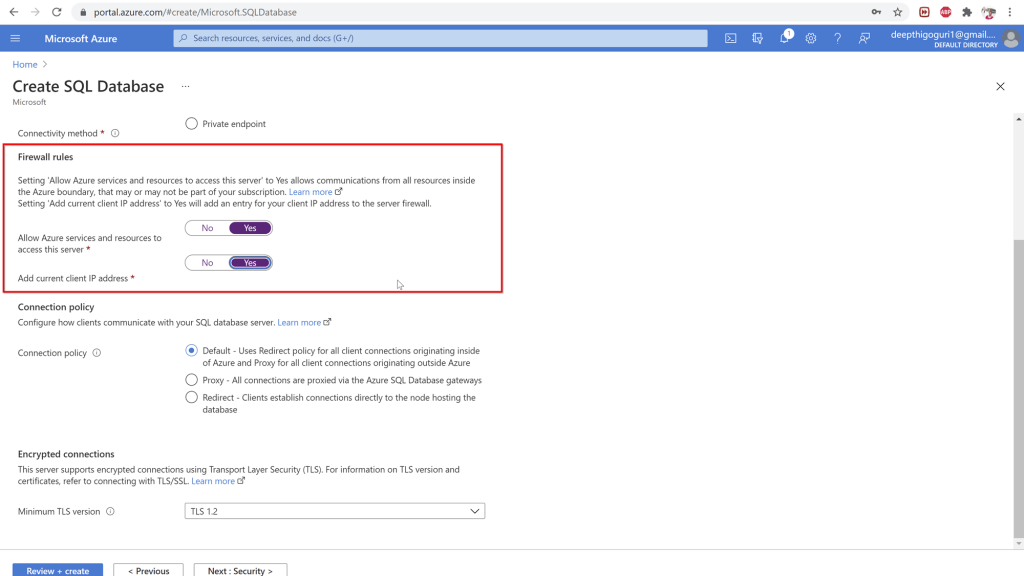
Firewall rules:
Allow Azure services and resources to access this server: Any resources in azure can connect to your server. Not a secure option. try to avoid choosing this option.
Add current IP address: enabling this will add the client IP address so it can connect to the server.
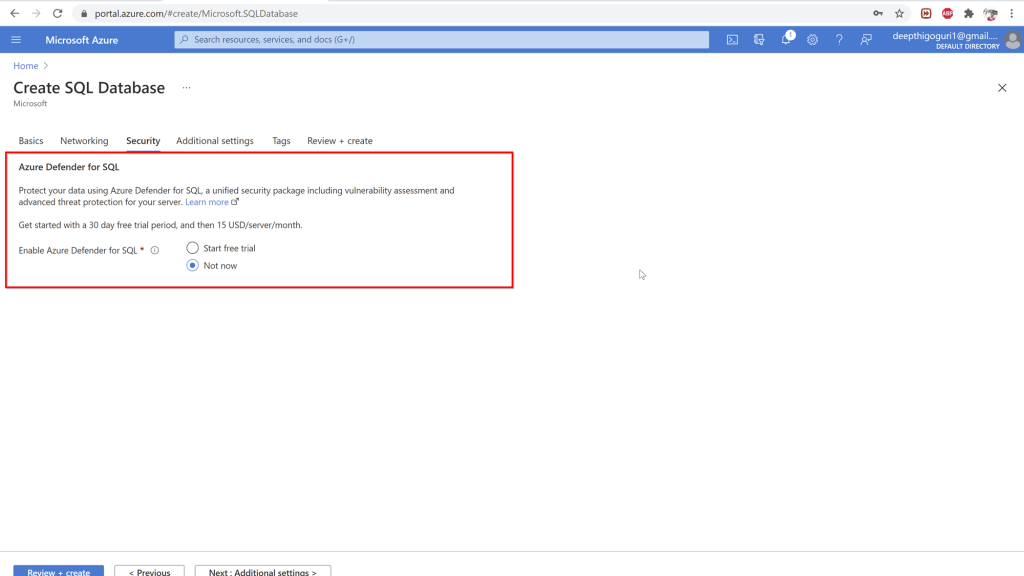
Under the Security tab, you will see the Azure defender for SQL. This is not a free service. You will have to pay 15$ per server per month.
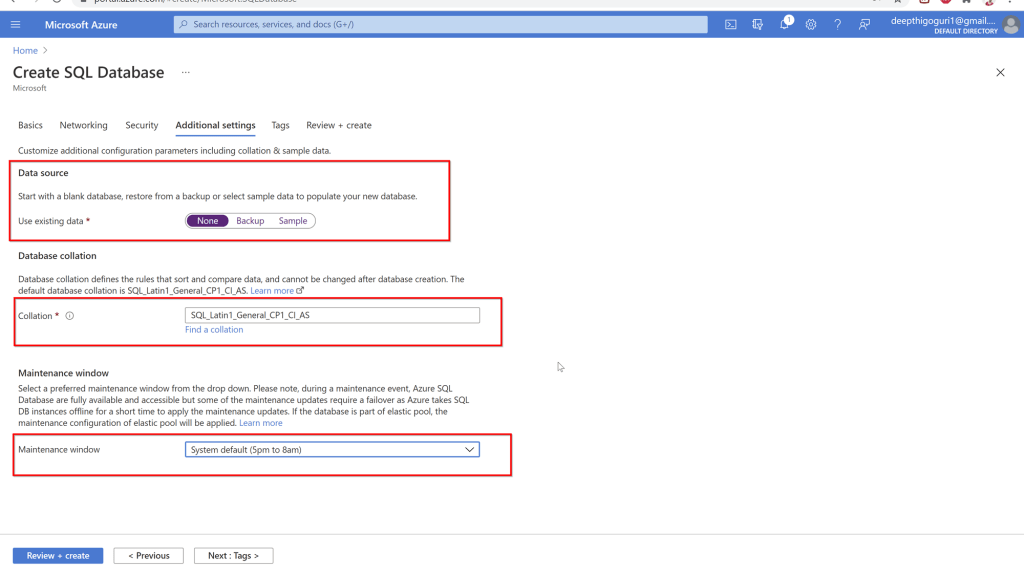
In the additional settings, chose how you want the database to be created. None will create just the database name and no objects. Backup is to get the database from the backup file and sample creates a sample of the adventureworks database. Select the collation while deploying the database. For the Azure SQL database, you cannot chnage the collation later.
Chose the maintenance window for the options provided.
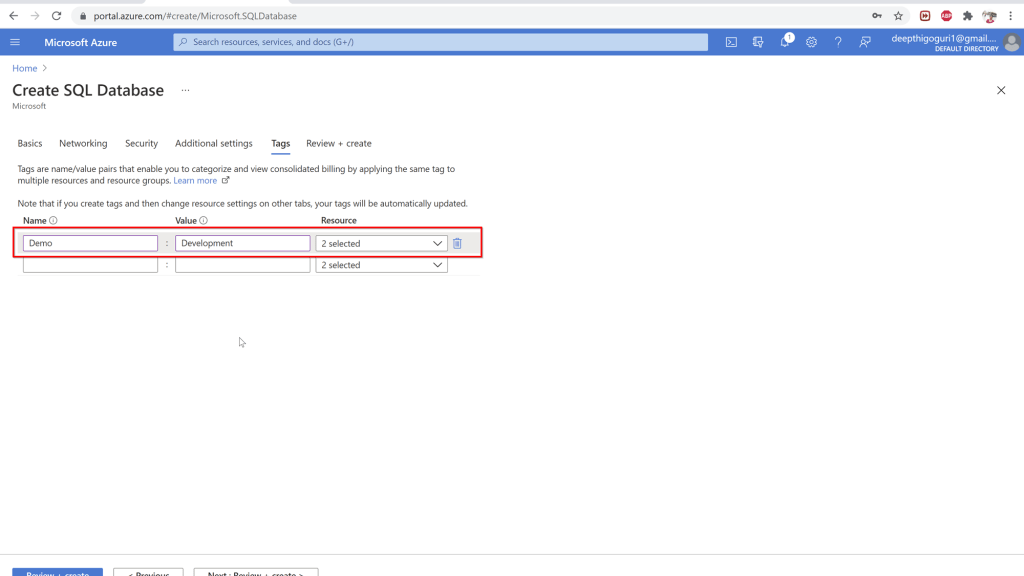
Under the tags, name the tag for this resource and a value. This will help to identify the resources later.
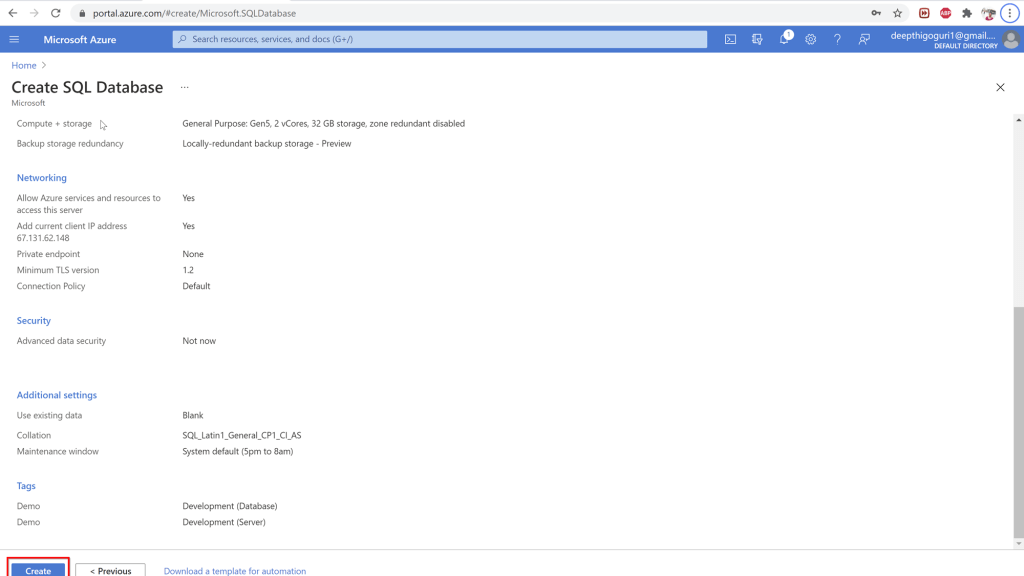
Click on review and create. Click on create at the bottom of the window. This will create a new Azure SQL database.
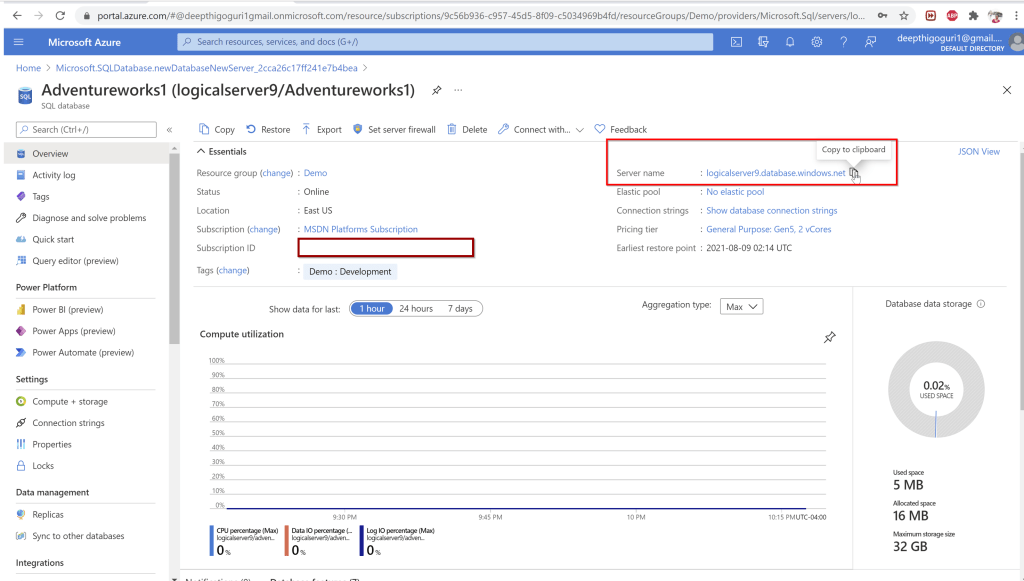
After the deployment is complete, you will be able to copy the server name, open the ssms and connect to the server using the admin login and password credentials.
Connect to the server using the credentials for the logical server admin with password
Things to remember:
You can chose the size and the number of the files for the Managed instance. You cannot chose the storage in MI and Azure SQL database. For Azure SQL, you cannot chose the number of database files.
T-log file for the Azure SQL database is 30% of the data max size.
Compatibility level is available for both MI and Azure SQL database
Query_store is turned on for all Azure SQL databases
Azure SQL Databases recovery mode is always full
You cannot stop and start the Managed instance and Azure SQL database
Proxy and redirection are the two ways that we can connect to Azure SQK database. Proxy connection is like a friend who visits your apartment always need to connect to the security guard (known as gateway here) before reaching your apartment (database). This is the default setting for connections outside Azure.
Redirect connection is like your friend gets an additional key as an authorized person for the apartment by connecting to the security guard (the gateway) and from that point the next connections can be directly reach the apartment (database). No need of additional hops in between. Redirect connection is default connection type within azure. To use redirect connection, ports 11000- 11999 needs to be opened.
We are going to learn about fundamentals of security in azure in the next blog post. Thanks for reading!
Deepthi is the Founder of dbanuggets and a SQL Database Administrator. As a Microsoft MVP, she helps SQL communities by sharing her expertise in resolving SQL Server problems globally.
Thanks to Mala for hosting this month of T-SQL Tuesday! Mala wanted us to write about some of the T-SQL Coding standards.
Some of the coding standards that I mention here are obvious but I know how many times I obviously skip the simple coding standards. I believe every bit of simple things we do every day matters!
Here are few quick but effective coding standards I wish I knew earlier:
1. Get your T-SQL code formatting faster than before
We all love to write the code that can help you and others read better later but I know it is time consuming, especially when you are trying to focus more on writing the effective code that can run faster. My mindset while typing the code: Throw the formatting out of the window, let me just type this and get the results I need. I know many of you have the same mindset. If you are just typing few lines of code, that’s totally fine but building a huge stored procedure with complex logic needs formatting not only to make it easier for others to read it later but to help yourself along the way. Formatting doesn’t have to be complex with some free online tools like poorsql. This tool was introduced to me by one of my favorite SQL community champions, Randolph West. Thank you my friend! You saved me many hours. There are also other similar free tools like sqlformat.
2. Error and Transaction Handling: Saved many Jobsout there
Don’t wait until you break something and then figure out there is a way to avoid it in the first place. This was me at the beginning of my career. I learnt it in the hard way. These were all my face expressions at my computer as I write something which looks like a code.
From handling and capturing the errors to transactional handling the right way, knowing how to handle the errors and transactions is crucial when troubleshooting and modifying the data. Learn about error handling here and transaction handling here.
3. Are you inserting large number of rows as a schedule SQL agent job? This is for you
This is simple but effective. Add update statistics step as the next step in the agent job for the tables you just imported the data into. This will help optimizer to chose the right operators in your execution plans with the updated stats.
4. Start using SQLCMD mode, you will thank me later
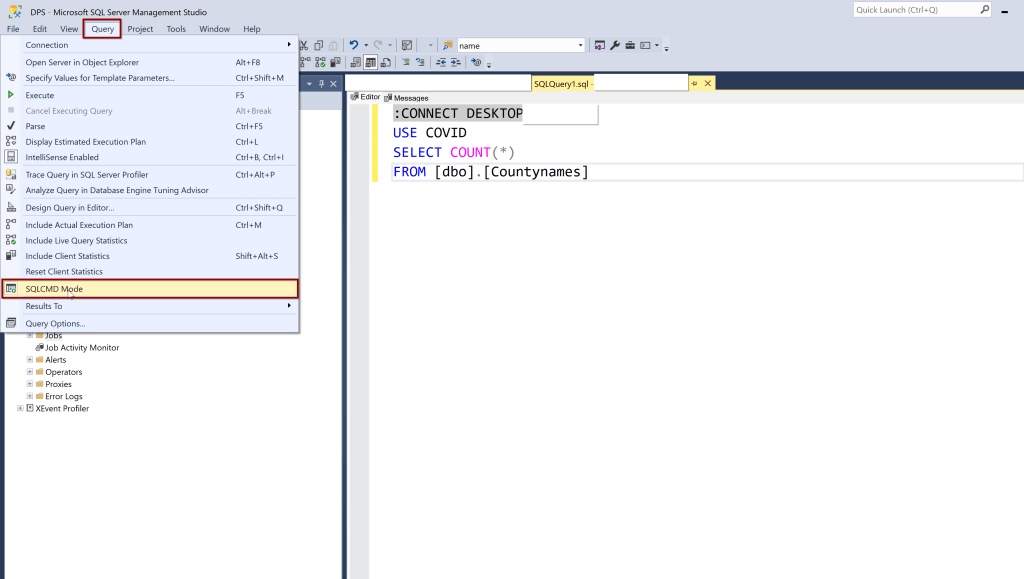
Did you ever faced a situation where you accidentally deleted the rows in production instead of deleting the rows in development environment? If yes, then keep on reading. Start using SQLCMD mode. After you enable this mode, run your query with beginning
:CONNECT Servername
USE DATABASENAME
Your query art here
Make it as a coding standard, this will help you remember where you are running the code no matter what your query editor is connecting to. If you need to run the same code on different server, you just change the server name from the first line. At the beginning, I felt adding this line at the beginning of the code is kind of pain but then after I get used to it, this has become one of the best standards. As I execute any code these days, my eyes automatically rolls to the first line, looking for the server name in the connect statement. This becomes even more helpful when you want to document the code you are running on different environments (DEV/TEST/QA/PROD). Learn about SQLCMD here.
5. Consolidate the number of Indexes: You could have duplicates
If you regularly implement the indexes from the recommendations provided on the execution plans, make sure to check if you already have an index with all the columns mentioned in the recommendations but just a column recommended not in already existing index. Try to fit in this additional column into the existing index if necessary but do not just go ahead and run the recommended index query. You may already have an index. Regularly check for any duplicate indexes you may have costing you lot of resources maintaining them.
6. Checkout the datatypes of variables used in your queries
The variable datatypes that you use in your queries for where clauses should have same datatypes for the columns you are referencing in your tables. If they are not the same, the optimizer have to go through the implicit conversion as an additional step. This may cause performance impact and may not use the required indexes when it have to. This can take more resources to execute the query and may be harder to find the reason later for why the query is running slow.
These are some of the T-SQL coding standards that I use on regular basis. I am looking forward to read and learn from other SQL family members on their T-SQL standards T-SQL Tuesday posts!
















 Deepthi Goguri's SQL Server Blog